Workers
A worker is a shell script that wakes up every 30 seconds, scans the queue, takes one open
ticket, and starts a session. One file is one worker (<root>/workers/<name>.sh), and w1 is
already there when you create your first project.
The workers screen - what one row tells you
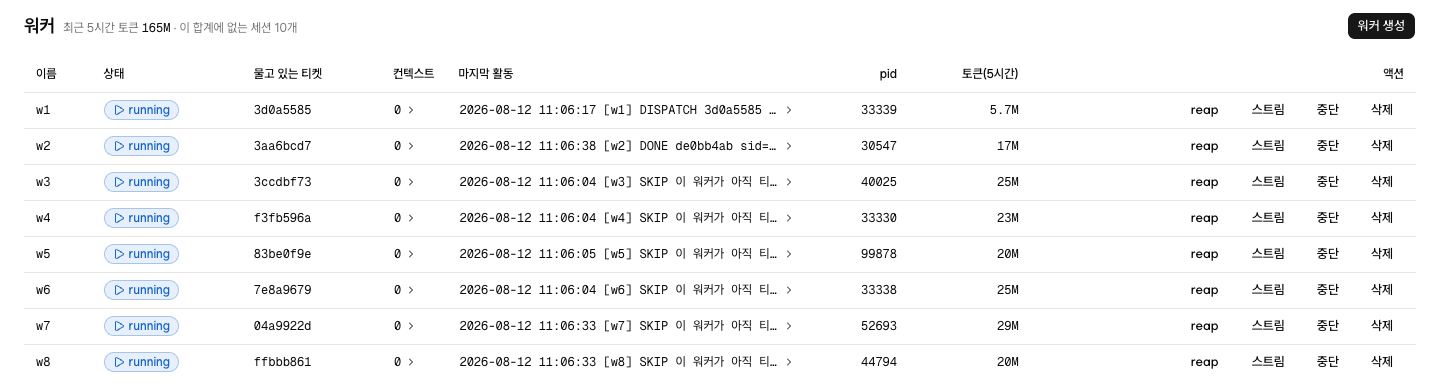
Workers in the left nav. One row is one worker, and that row alone tells you what is going on
right now. The columns, left to right, are Name · Status · Holding · Context ·
Last activity · pid · Tokens (5h) · Actions.
- Status is one of four.
runningmeans a session has been started and the worker is waiting for it to finish.idlemeans the worker is on cron and is holding nothing at the moment.stoppedmeans it is out of crontab and never wakes up at all (not in the crontabsits next to the badge), andstalemeans the session process died and only the claim is left behind. - Holding is the hash of the ticket it has right now. Press it to go to that ticket in detail.
- Context is the number of reference documents this worker sends along with every session.
Press the number and the row expands so you can edit the entries right there. The list every
worker gets is not in the table. Press
Worker settingsat the top right and the first section isCommon context; a line you put there goes to the top of every worker's own list. - Last activity is the last line
runner.logprinted under this worker's name, verbatim.DISPATCHmeans it just handed a ticket to a session.SKIPmeans it woke up, found the previous session still going, and went back. Press it and the last 20 lines expand. - pid is the number of the process running that worker right now.
runningandstaleare told apart by whether that number is alive (The screens §Workers). - Tokens (5h) is the tokens used by sessions that finished in the last five hours. The limit is attached to one account rather than to each worker, so this column shows you who has been drinking how much out of the one tank.
The Worker settings dialog has three sections. The first is the Common context above. The
second, The rest of the worker settings (read-only), shows five values: the persona, protocol, and
ontology directories, and the in-progress and done suffixes, as they are actually set for this
project right now. Where workers disagree, it writes them out side by side. To change them, edit the
worker file by hand (Worker environment variables).
The last section is Stale collection. It holds one reap button, and pressing it puts any
ticket left in progress whose session has died back into Open. It is a button for doing right now
what a worker does on its own every 30 seconds. reap scans the whole queue, not one
worker, which is why there is one button no matter how many workers are in the table. The output
appears inside that section, and if there is nothing to collect you get the single line
No stale tickets to collect. A project with no workers has no Worker settings at all, so it
has no such button either.
The 30-second cycle - a script that wakes up and dies
A worker is not a process that stays up. Cron runs that script from the top once every 30 seconds, and the script dies when it has done its work. With no ticket to take, it scans the queue, ends on the spot, and leaves nothing in the log.
So idle does not mean "waiting its turn." It means there is no process for that worker at
this moment, and a new one appears at the next :00 or :30. Those 30 seconds come from the two
lines that go into crontab (see §Five things that come with a new worker below). That is also
why there is no field on screen to tune it.
It runs whether the app is there or not. Close the app and tickets keep being processed; leave
it open and nothing goes faster. In the other direction, take the crontab line out with Stop
and that worker never wakes again, app or no app.
Workers and sessions - one ticket at a time
The next thing a worker does after claiming a ticket is start a session. A session is the agent
process that carries that ticket (claude -p by default), and it gets a prompt made of the
persona profile and the collaboration protocol with the ticket it claimed appended. The session
reads the ticket body itself, on the spot. The worker waits in the same place until that
session ends. A ticket that takes 30 minutes means it waits 30 minutes.
Cron still calls that worker every 30 seconds while it waits. The new one sees that the previous
run is still working, leaves one SKIP line, and backs off. That is why no worker ever starts
two sessions and no ticket is ever dispatched twice. The device that holds that spot, and how it
connects to the number of workers, is in How many to run at once
§The worker lock.
Workers finish fast and sessions run long. A running that has been up for a while means the
session that worker started is still working. If you have something to say to that session right
now, go to Talking to a running session.
Taking a ticket - renaming one file
"Take" is not a metaphor. What a worker actually does once it has picked a candidate is one
thing: turn <hash>.md into <hash>.wip.md. If that works the ticket is this worker's; if
another worker already renamed it, the attempt fails right there and the worker moves to the
next candidate.
This is why several workers can watch the same queue at once and never take the same ticket. The moment of checking is the moment of claiming, so no other worker fits in between. How a rename becomes a lock is in The states a ticket passes through §Why the filename is the lock.
A candidate is a ticket that is open and whose prerequisite tickets (deps) are all finished.
Among those, higher priority goes first, and ties go to whichever was created earlier. Priority
is priority: in the ticket frontmatter, 1 to 5, where 5 is highest. Leave it out and it is 3.
If a ticket is open and still nobody takes it, there are two more gates under priority. Each persona can have a cap on how many tickets it holds at once, and a priority 1 ticket is a candidate only while nothing is in progress. Both are in How many to run at once §Four places where fewer run than you have workers.
Why every worker gets its own tree
Two sessions committing to the same branch in one directory overwrite each other's work. That actually happened in this project. A new worker inherited the template worker's working directory value as-is, three sessions ended up committing to one branch in one tree, and the screen could not even show it as a fault.
So that path is now derived from the worker name. The name is the directory, so a value that points two workers at the same tree cannot arise in the first place.
If git is not managing the project folder, no tree is created and you are simply told so. The worker file and the crontab entry are still valid. A setup with one worker does not need a tree.
One press of New worker
One worker takes one ticket at a time. So when the Open lane keeps piling up while the
In progress lane always holds a single card, that worker has become too few. There is one way
to add, and it is this section: make another one. How many is right is in How many to run at
once.
Press New worker at the top right and the only thing the dialog asks for is a name. Keep it
short, like w2. Letters, digits, _, and - only, and this name becomes the filename and the
working directory name as-is.
There is no field here for the engine or the model. A new worker is made by copying a worker that already exists, so it inherits the engine setting too. A project with no worker to copy is covered separately in §With no workers at all, the button is the same below. The place to change which CLI starts the session is in §The persona decides the engine and the model below.
The whole point of this flow is that the success screen has no registration command on it. You
get a sentence saying it was created and
Registered in the crontab — it starts claiming tickets in 30 seconds., and that worker shows up
in the list as idle rather than stopped. There is no reason to open a shell.
Five things that come with a new worker
- The worker file
<root>/workers/<name>.sh. A worker that already exists is copied as the template and left at 755. The first line of the success screen names the file it was copied from. - Two crontab lines -
:00and:30. Cron is the built-in macOS facility that runs a command for you at times you set, and crontab is that schedule. One worker takes two lines because the finest unit cron can handle is the minute. - A git worktree
<root>/worktrees/<name>and a branchwt/<name>. A branch is a line of work split off the same code, and a worktree is that line laid out in its own folder. Think of each worker working on its own line inside its own folder. - A
.dirasymlink - the shortcut inside that worktree that points at the queue. Sessions write.dira/tickets/…as a relative path, so without it a worker cannot find its own ticket. - Verification. It follows that symlink back to check that it resolves to this project's queue. It does not stop at seeing that a link is there.
It does not install dependencies (nothing like npm install). That is the ceiling of this
feature. The first time a new worker's working directory takes a frontend ticket, there is no
node_modules. The command differs per project, so the app has no way to know it.
With no workers at all, the button is the same
When the table is empty, all that is left in its place is the line No workers and the
New worker button. You see this screen after registering a .dira someone else was using, or
after deleting every worker you had. What you press here is that same New worker. Open the
dialog and Name already holds w1, so you can create it just like that, without touching
anything.
With no worker to copy, the engine repo's worker.sh.example stands in as the template. Writing
the file, putting two lines on the crontab, then making the worktree and the .dira symlink and
following it back - §Five things that come with a new worker above repeats exactly. One word is
all that changes. When the first line of the success screen shows worker.sh.example as the
source, this is the path that made the worker.
Only one case still sends you to a shell. If the app cannot find the engine repo it does not
create the file at all: you get Couldn't create the worker, the paths it looked in as the
reason, and then a copy button with the command that makes the first worker by hand. The
<dira 레포> inside that command comes out unfilled. The app not knowing that value is exactly
what this failure is, so you have to type in the path of the repo you cloned yourself. Getting to this screen means the installation is
broken, not the worker settings, so it is not something filling the form in again will fix.
The three buttons at the right of a row
Every row carries Stream · Stop (or Re-register) · Delete. The reap that used to sit
with them is now in Stale collection, the last section of the Worker settings dialog at the top
right. It is an operation that scans the whole queue, so it gives the same result from any row,
and there is no reason to keep one per row.
- Stream opens the
Progress recordof the running session. It opens only when the worker isrunningand the ticket it holds is known, and interjecting happens inside it (Talking to a running session). On rows where it cannot open, the button is not removed; it stays dimmed. Onlyclaudeandgrokleave a progress record, so a session running oncodexoragynever opens this button, and interjecting works onclaudeonly. That is not a fault, just a different feature set, and the ticket gets done the same way.
The other three touch different things.
| Button | What it does | What is left |
|---|---|---|
Stop | Takes that worker's line out of crontab | The file and the working directory stay |
Re-register | Puts the crontab line back | The exact reverse of Stop, and nothing more |
Delete | Takes the crontab line out, then deletes the file | Not one ticket is deleted |
StopandRe-registershare a spot and never appear together. Crontab decides which one, not the state. A line to remove meansStop; none meansRe-register.Stopdoes not kill a running session. If a ticket is being held, it tells you it will halt once that ticket is finished.Deletehas a fixed order: crontab first, file second. Reverse it and cron runs a file that is not there during that one minute, piling errors into the log. If the crontab removal fails, it stops without deleting the file.- A
runningworker cannot be deleted. The running session and the claim it holds would be left hanging. Stop it first, and delete it once the ticket it holds is finished.
The persona decides the engine and the model
There is no Engine column in the worker table. Which CLI starts the session is decided by that
ticket's persona:, and the place to change it is Personas §Dispatch policy.
Press the Engine value and you pick one of claude · codex · grok · agy and a model
within it. A model name not on the list goes in through Type one in…. Leave it at Not set and
it uses the engine of whichever worker took the ticket.
Limit in the same section is how many in-progress tickets that persona may hold at once. Add
workers and that one persona still does not go past that number.
When it breaks partway - copy just the commands that are left
Writing to crontab can be blocked by the App Management approval on macOS, and a worktree can
be blocked by a name collision or by permissions. The app still does not roll back. It shows you
where it got to and why, right there, and gives you just the remaining commands behind a copy
button. Re-running a step that already finished is how you walk into a trap.
Those commands are not written down in this document for the same reason. On success you never see them, and the failure screen fills in the exact paths of that moment for you.
The procedure for making a worker by hand and putting it on cron yourself, without the app, is in the appendix Running the engine alone.
Next is How many to run at once.