Talking to a running session
You do not have to wait for the turn to end. Open the Progress record on a ticket, find the step the session is on right now, and there is an input field at the bottom of it. Put in a line, send it, and that sentence goes into the session's stdin. The session drops what it was doing and follows it. stdin is the channel a running program takes text on from outside. The stream dialog on the worker screen has the same field; that one is not split by step, so it sits at the bottom of the box.
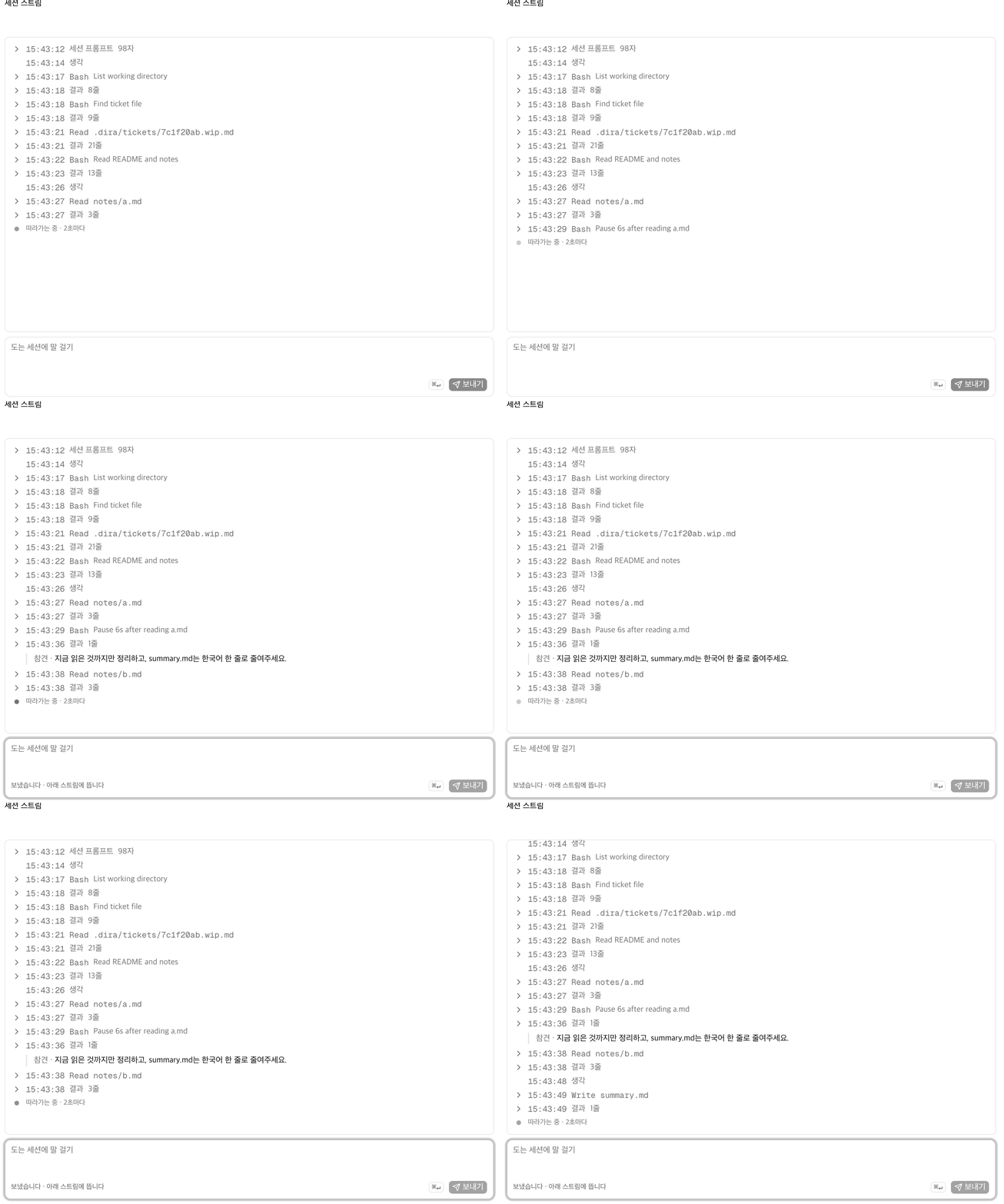
That is a real round trip. The interject lands just after the session read notes/a.md: "Wrap up
with what you have read so far, and cut summary.md down to one line in Korean." Thirteen seconds
later the summary.md the session left behind is one line.
- The entrance is one FIFO per session. A FIFO is a special file made for programs to pass text
to each other, and the line that goes in first comes out first. The dispatcher that hands a
ticket to a worker makes it the moment it claims the ticket, and deletes it when the session
ends. That path is the
inbox:value in the ticket frontmatter (see The states a ticket passes through). When the session ends, the value empties out with it. - The stream comes from the transcript claude is already writing. Nothing new gets recorded for the screen's sake.
- An interject is not an echo the screen invented. It is a line that really is in the transcript. The sentence you sent goes into that session's input record exactly as written.
- The window is open only while the session runs. It closes when the turn ends.
This window only opens on an engine that takes streaming input (claude -p by default). It is
the claude worker that opens the field on screen too. If the engine takes its prompt all at
once through argv, the way codex does, the entrance never gets made in the first place. argv is
what you hand a program after its name when you start it, so once it is up there is nowhere left
to put more words. Which engine a ticket comes up on is decided by its persona
(Personas §dispatch policy). When the field is disabled, that spot tells you
which engine cannot take one.
The first prompt does not use this entrance. It is fed through a file instead of the FIFO. If the prompt runs past the pipe buffer (64KB) the writing side blocks, and an engine in that state stalls before it even starts. Around six workers, that deadlock happens every time. So one file goes in first, and from the next line on the FIFO becomes stdin. The interjects a person pushes are the lines that come after.
Attaching files
Files go into the input field too. Pick them with the clip handle or just paste (⌘V). Taking a
screenshot and pasting it straight in is what this is mainly for. It uploads the moment you pick
it. The screen holds it as a chip and folds it into the body when you send.
An attachment does not carry bytes across. It puts the file down and writes the path into the
prompt. What this field sends is one line into a FIFO, so there is no room in it for an image.
The receiving side has Read, though, so the app puts the file somewhere the session can reach
and appends the absolute path to the end of the prompt.
<the body you wrote>

첨부 파일 — 아래 경로를 Read로 읽어라:
/Users/.../myproject/.dira/attachments/ab12cd34-screenshot.pngThat note line is Korean because the app writes it that way, in one hardcoded string, whatever language the screen is in.
What the session reads is that block, exactly as shown. But when you read the message back on screen
after sending it, the note line and the path lines are gone and the attachment shows up as a preview
instead. Image files (png, jpg, jpeg, gif, webp, avif) come out as thumbnails.
Everything else, svg included, is a filename chip with a clip on it. Either one opens the original
in a new tab. The exception is a box where you edit the text. There the block still reads as raw
text, and deleting those lines is how you take an attachment back off.
- Files land in
<queue root>/attachments/. Eight hex characters go in front of the filename, so attaching the same name twice never overwrites. Nothing is deleted automatically. Ticket bodies and transcripts reference these paths forever, so deleting one turns history into a broken link. Clearing out space is a person's job. - The ceiling is 20MB per file, ten at a time. Past that, only the offending file is refused and
the reason stays where its chip would have been. There is no restriction on type. If
Readcannot open the format, the session will say so. - File contents never get copied into the body. Even for a text file, only the path goes in. Otherwise a ticket body swells by a whole log.
- Four fields take attachments: New request, New ticket, this one (interject and follow-up), and the question box on the project home. All four look the same.
- Attach two screenshots and both chips read
image.png. That is the name Chrome gives them. On disk the eight characters in front keep them apart. - There is no drag and drop.
The lock an agent puts on itself
Instead of guessing its way forward, it asks back. It appends the question to the ticket body
and sets deps to a file that does not exist, which makes the ticket unclaimable by any worker.
The deps you saw earlier were for waiting on a ticket that had not finished yet (the details
are in Writing a ticket yourself); the difference here is that the hash
does not exist at all. Write the answer and that file comes into being, and the lock comes off by
itself.
- A locked ticket is still visible in the queue. That is what makes it answerable from the screen.
- No person moves the state back. Locking and unlocking run on the same rule.
- For the same reason, a ticket that keeps dying does not burn sessions forever. It is reclaimed automatically twice, and the third time it turns into a question.
- If the last section of the body is
## 블록(the block section), it turns into a question right away, whatever the count. The session hit a wall and stopped itself, so there is nothing to gain from running it again.
What actually runs those four lines is reap, the procedure that gathers up tickets left behind
by dead sessions. When it finds a ticket whose session died, it first raises attempts and
reclaims it automatically back into the queue. But if it dies twice more for the same reason —
from the third time on — it appends ## 질문 n (a numbered question section) to the body instead
of reclaiming, puts a hash that does not exist yet into deps (and awaiting:), and returns the
ticket to open. There is a shortcut that ignores attempts too. If the last ## section of the
returned body is ## 블록, first attempt or second, it goes up as the same request for an answer
that instant (reclaim in tickets.py). Until the answer file exists, deps is unmet, so no
worker picks that ticket up. Once an answer is there, attempts counts again from zero.
Next is Terminal, files, and source control.