Epics
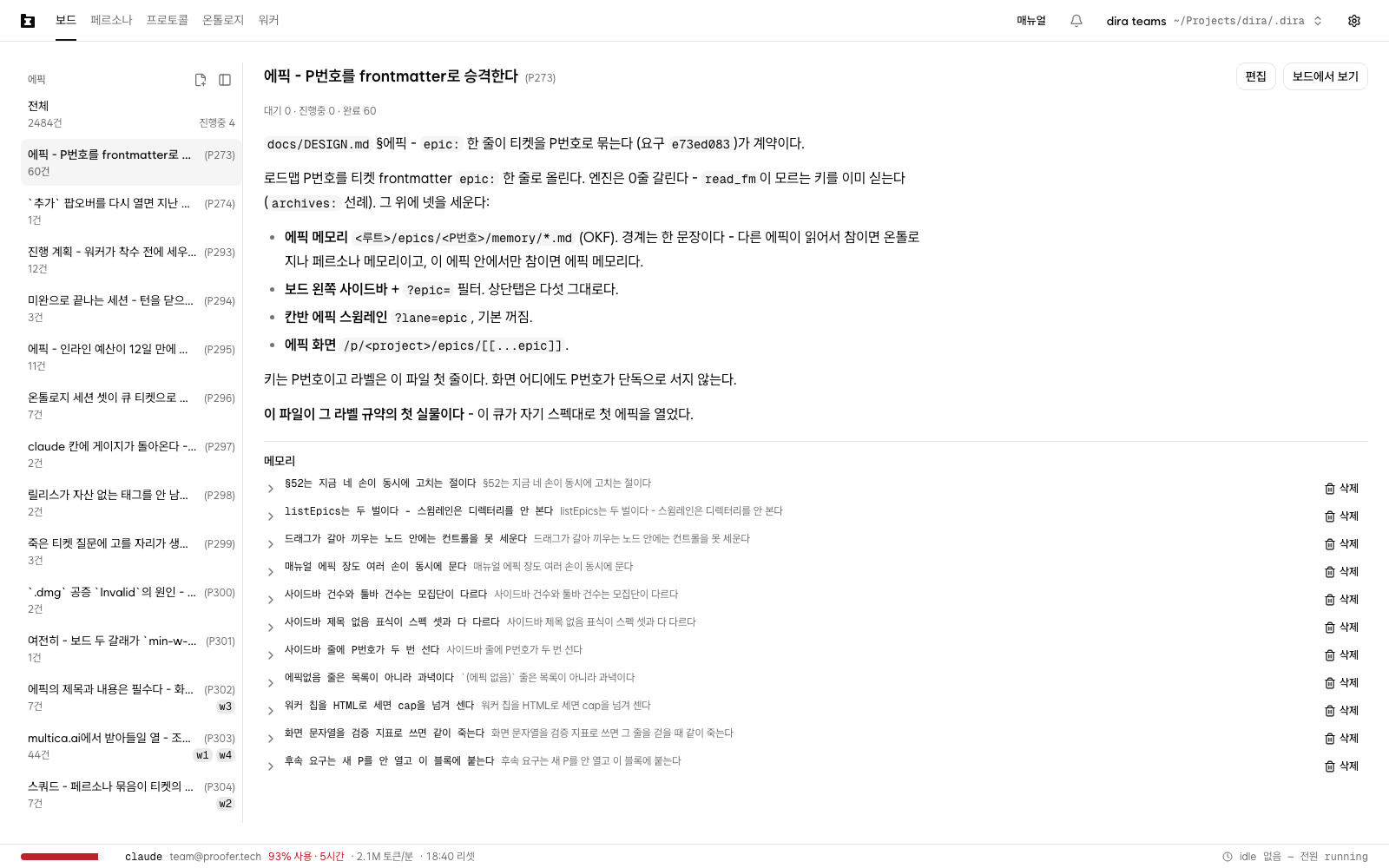
Once two subjects start running in one project, the board mixes. A ticket tearing up the sidebar
and a ticket about a payment bug sit next to each other in the same Open lane. Which one got
how far is something you find out by reading titles one at a time.
An epic draws a line between them. Write one epic: line in a ticket's frontmatter and that
ticket goes into a group, and the group's list appears on the left of the board.
The engine does not look at this value. Dispatch order and priority are unchanged. What changes is three screens and one memory folder per group.
epic: - one line that groups tickets by number
The value is one number.
---
ticket: 230f26c5
title: Manual - the epics chapter
kind: work
persona: writer
epic: P273
---Unlike deps, it is not a list. One ticket goes in one epic. If a ticket spans several groups,
usually the ticket is too big.
The value is a key, character for character. Neither the app nor the engine takes the string
apart, so P273 and P273-2 come up as two different epics. If you use roadmap numbers,
write the number itself and nothing else. On a project with no roadmap, any short name that does
not collide with another group will do.
You do not have to write one. A ticket without epic: is normal. There is just no sidebar row
for looking at only those; they are counted inside the All row at the top. To see them
together, turn on swimlanes - there they gather into one (No epic) band (Swimlanes below).
Where to write epic: on a ticket
Two ways. A ticket sitting on the board as an Open card can be dragged and dropped, and
everything else gets a line in the file's frontmatter. The new-ticket dialog has no field for
it.
Both put a ticket into an epic that is already there. Opening an epic itself happens somewhere
else (Opening a new epic below). An epic made there touches no tickets at all.
Dragging on the board. Pick up a card in the Open lane and drop it on an epic row in the
left sidebar or on a swimlane band. That ticket's epic: changes to that value. Its state, its
body, and every other frontmatter line stay as they were. The axis you are moving is the epic,
and only that.
- Pick up a card and the sidebar list header changes from
EpicstoDrop on an epic. The cursor changes over a place you can drop on, the row you are aiming at gets an outline, and its lower line becomesMove to this epic. Let go and the count there goes up by one. No confirmation, no completion notice. - To take a card out of an epic, drop it on the
Allrow at the top. Aim at it and its lower line becomesRemove from epic; let go and theepic:line is deleted from the file. That row is the only way out. With swimlanes on, the(No epic)band grows by one. The count does not move - that ticket was counted inAllbefore you took it out too. - Pressing that row and dropping on it do different things. Pressing clears the epic filter; dropping takes the card out of its epic. The hand that presses and the hand that drops are different, so the two do not get confused.
- Drop a card back on the epic it is already in and nothing is written. Same for dropping a card
with no epic onto
All. The file is not touched, so the screen does not change either. - Rows in the table view do not drag. What drags is a kanban card.
- If a red warning line appears under the toolbar, that drop did nothing at all. Either a worker claimed the ticket while you were dropping, or the file left the queue. Read the reason and try again.
In progress and Done cards do not lift, however you grab them. That is a lock, not a
fault. A ticket in progress has a session working in that file right now, and the screen cutting
in would put two hands in one file; a done ticket is this queue's permanent record. To move an
in-progress ticket's epic, press Unassign on the ticket detail first. Once the card is back in
Open it drags, and editing the file directly comes after that too.
Writing it in the file. This is the way for a ticket that has no card yet or cannot be
dragged, and for grouping several at once. Open the ticket file and write one epic: line in the
frontmatter.
- The queue folder is the grey path at the top right of the screen, beside the project name.
Ticket files are under
tickets/in it. - The filename is written out in the
Filerow at the bottom of thefrontmattersection on the ticket detail.
Write the line, save, and the epic is in the sidebar the next time you open the board. Do not go back and attach one to tickets that are already finished. Done tickets are read-only.
New request writes this line for you. Submit from a board with one
epic selected, or from that epic's screen, and the epic you were looking at becomes the new
request's epic:. The form has no field. The confirmation tells you instead -
Request received in the <epic title> (P273) epic. A board with nothing selected, a screen
carrying only a valueless ?epic=, and screens with no epic at all such as workers or settings
get no line, and the confirmation says nothing about an epic. If it landed in the wrong epic,
drag that card on the board. You can also open the ticket with See the request you submitted
in the confirmation and fix the frontmatter. A worker picks it up within the minute, so if one
already has, Unassign comes first.
Opening a new epic - the title is the first line of README.md
The number is read by the machine and the title is read by people. The two are in different files. There are two ways in, the screen and the file, and both make the same single file.
Opening it from the screen. In the header row of the board's left Epics list, just left of
the collapse icon, is one more small icon. Hover it and it reads Create epic. The epic screen's
left list is the same column, so it is in the same place there. With the list collapsed it is not
there. Expand it first.
Press it and a two-field dialog opens. Title and Key, with the caret in the title field.
- The key is already filled in. It is the largest
P<number>in the list right now, plus one: ifP274is the last,P275is sitting there. It is a suggestion rather than a rule, so you can delete it and type any other string. If there is no such shape at all, the field is empty, and while the key is emptyCreatewill not press. - The title is required too. Same as the key. While it is empty
Createwill not press, and whitespace alone will not press it either. Skip the dialog and call the server directly andEnter a title.still stops you. No folder and no file are made in that case. - Creating makes one file,
<queue folder>/epics/<key>/README.md. The first line is the title you just typed and the rest is empty. Nomemory/folder, no ticket, no roadmap block comes with it. - There is no body field in this dialog. At the moment you open an epic, what the group is
about often does not go into a paragraph yet. The body is still required, so you fill it in
afterwards from
Editon the epic screen. - Put in a key that already exists and the dialog stays open with a red line -
That key already exists: P273. That epic'sREADME.mddoes not change by one byte. The screen does not paint over a title somebody else wrote.
Once it is made, only the dialog closes. The screen stays where it was, and a <title> (<key>)
row slots into the sidebar. It lands just under the epics that hold running tickets, and at the
front of everything below them, since its number is the largest there (see The board's left
sidebar below). Its lower line reads 0 tickets and its right end is empty, since no ticket
points at this epic yet. No filter gets applied on its own. From the moment it stands, that
row is a drop target. Drag an Open card onto it and the count starts
climbing. There is no swimlane band yet. A band is a container for cards, so it appears once a
card goes in.
The place to change the title and the body is the epic screen. Edit in the header on the
right opens the one README.md. The body field the create dialog did not have is there.
Two things the screen will not do - delete and rename. Handle the folder yourself. Renaming
the folder does not bring the tickets carrying that key along. Fix epic: in their frontmatter
as well.
Opening it as a file. Make epics/<number>/README.md under the queue folder and write the
title on the first line. The sidebar item, the swimlane band header, and the epic screen header
all take that one line.
<queue folder>/epics/P273/README.md    first line is the title, the rest is the body
<queue folder>/epics/P273/memory/ memory. Sessions make thisThe body you write after the first line appears under the header on the epic screen. That is where you record what the group is about and how far it has to go before you close it.
Both the title and the body are required. When a person makes it, and when a session writes the file. An epic that stands as a number alone is a group nobody can identify without opening the roadmap separately, and meanwhile tickets carrying that number keep piling up. There is only one check - if there is one character left after stripping whitespace, it counts as filled. No minimum length, no fixed shape.
Leave it out and the screen says so. No title (P273) appears where the title goes, a
No README badge appears in the epic screen header, and a warning triangle appears on the
swimlane band header. Nothing quietly floats a bare number. What is missing has to look missing,
or nobody fills it in. That said, three places report an empty title and only the epic screen
reports an empty body. The sidebar and the band read the first line only.
The number stays beside the title throughout. It is the only clue that the number on the roadmap and this screen mean the same thing.
The board's left sidebar - looking at one epic
Open the board and the Epics list appears at the left, under the toolbar. All is the top row,
and under it the epics one per row. The top of the list is where the running epics are. An
epic holding even one open or in-progress ticket comes first, and an epic whose tickets are all
done goes behind them. Within either group the larger number is higher, so the epic you
opened most recently sits at the top of its own group. An epic row carries the title on the upper
line with the number after it, small, in parentheses. The lower line is that epic's ticket count,
and the right end of that line is where the running sessions go.
The order shifts while you are looking at it. The screen rereads the queue every five seconds and works out the order again each time. Close the last open ticket and that row drops to the lower group. There is no divider between the groups and no label, so the order itself is the only clue that a row has moved.
What appears there is worker names. The workers holding this epic's tickets right now line up
as the worker marks that go on kanban cards - w2 w3 w4. If even one name shows,
that epic is running. The words "in progress" do not go next to it - the names already say that.
Three fit, and past that it folds into a single +2. A row with an empty right end is an epic
nobody is on. It does not say None.
Sometimes you meet a row standing with In progress 2 and no names. Two tickets are running and
the screen could not read their owner. A worker mark appears only when owner in the frontmatter
has the shape writer / w7-3693d37d, and a ticket somebody claimed by hand has some other string
there (CLI, handclaim). The reason the words stand in instead is simple.
Without the names too, a running epic and an epic with nothing but open tickets would look
identical.
There is nowhere to assign a worker to an epic. The dispatcher pairs one free worker with one
ticket, and this line only gathers the owners of in-progress tickets that share an epic:. So
when the ticket finishes, the name drops out with it. The owner of a done ticket is not counted.
Press a row and ?epic= goes into the address and the board draws that epic only. It is not a
new screen but one filter alongside kind, persona and status. So filters stack. Set it in kanban
and move to the table and it stays.
The place to clear it is All at the top. Press it and ?epic= comes out of the address and
the whole queue is back. Only the epic axis comes out. The search term stays, and so do filters
set on kind or persona. To shake all of it off, press Board in the top tabs. The address goes
back to /p/<project> and the view and the sort return to their starting values too.
That same row is where a card comes out of an epic. Pressing clears the filter, and dropping
an Open card on it deletes that ticket's epic:. One row with two meanings, but the hand that
presses and the hand that drops are different, so they do not get confused (Where to write epic: on a ticket above).
There is no row for looking only at tickets without epic:. Those tickets are counted inside
the All count, but there is nowhere in the sidebar to pull that share out. Type ?epic= into
the address with no value and you do filter to exactly those, even now. When you do, no row in the
sidebar lights up - not even All. A filter is set, and All lighting up would be the screen
lying. And nothing anywhere tells you that filter is on. The one place that names a filter is
the Epics: (No epic) dismiss badge on the No tickets match these filters screen, and for this
filter to reach zero there would have to be no ticket without epic: in the queue at all. That
almost never happens. So a screen with fewer cards and no indication is the normal one. The hand
that undoes it is the sidebar's All row - press it and ?epic= comes out of the address.
The count on the All row is a straight count of the ticket files in the queue folder. It does
not equal the sum of the epic rows below - tickets with no epic: are the difference, and no
epic row counts them. In progress n works the same way. Being larger than the toolbar's
Tickets: n / m is normal too. The toolbar counts only what the board draws as cards, which
leaves out answer files and archive tickets, and the sidebar counts do not look at filters at
all.
Read a cut-off name by putting the cursor on the row. The first line is a tight space, so a title only slightly long has its end cut. Rest the cursor on the row for a moment and a panel opens on the right, unfolding downward what the row had folded up - the full title and number, all three counts, every worker name. A cursor sweeping past quickly does not open it.
The one 41 tickets the second line had merged splits in the panel into
Open 1 · In progress 1 · Done 39. The sum is the same, and the zeroes keep their place - the
In progress 0 that drops out of the narrow row is standing here. Workers do not stop at three.
The names the row folded into +2 are all there, none missing.
At the bottom, a P273 memory button takes the full width. That is the one door from the board
to that epic's memory screen (The epic screen below). While the panel is open, moving the
cursor into it does not close it, so you can read the name and press straight through.
This door opens by cursor only. The panel opens on the cursor alone, so a hand moving by tab
and a hand pressing the screen with a finger have no route to this button. Then type
/p/<project>/epics/<number> into the address bar instead.
The All row has no such panel. That row folded nothing - a two-letter label never gets cut, and
its count is the one number described above.
The table view has one Epics column at the far right. Press the header and it sorts by that
value, which is what you use to skim by group without setting a filter.
If the list is eating space, collapse it. The collapse button is the small icon at the right end
of the Epics header row, and hovering it reads Collapse epic list. Press it and the column
shrinks to a narrow strip with that icon left in place, now reading Expand epic list. Press it
again and the list is back. The collapsed state stays in the address as ?sidebar=off, so it
opens collapsed after a refresh and for whoever you hand that address to. Changing the view or
pressing a sort leaves it alone. A ?epic= filter you set does not come off when you
collapse - collapsing is a way of looking and a filter is a list, so neither touches the other.
What does happen is that the All row is off screen while collapsed. To clear the filter or take
a card out of an epic, expand it first. Expand and that row is exactly where it was. The epic
screen's left list (The epic screen below) is the same column, so it collapses in the same place
there.
Swimlanes - ?lane=epic
There is a mode that cuts the kanban into a horizontal band per epic. You turn it on in the
address. Put ?lane=epic on the end of the board address (/p/<project>/?lane=epic). There is no
toolbar button yet.
The columns are still the three. Open · In progress · Done appear once at the top, and
under them one band per epic. The band header reads like the sidebar item, with that band's count
beside it and worker names after that. Names do not fold here - as many as there are, that many
show. At the very bottom one more band is laid down for (No epic). The sidebar has no such
place - a band is a container for cards rather than a filter, so leaving it out would make every
card without epic: vanish from this screen entirely. That band is a target too, and dropping a
card on it takes the card out of its epic.
The band order is not the sidebar order. The smaller the number the higher the band, so the epic you opened first is the first band. An epic with work running stays at its own number here (above, §The board's left sidebar). Put the list on the left beside these bands and you find the same epic in two different places. A band does not move - if the target shifted while you were dragging a card, you would have to aim for it a second time. Even at the moment a last open ticket closes and the sidebar row drops to the lower group, the band stays right where it was.
- The
Donecolumn draws 20 at most, and that cut applies per band. The first band never eats all 20 and leaves the ones below it empty. - Combine it with a
?epic=filter and one band is left. They do not interfere. - It does not apply to the table view. There, the
Epicscolumn above does that job.
The reason the default is off is that there are queues where turning it on only costs you. If only
a few tickets carry epic:, nearly all of them go into the one (No epic) band and all you have
gained is one header line. Turn it on once two or three groups are standing.
The epic screen - editing the README and reading the memory
Rest the cursor on a sidebar row to open the panel and press the P273 memory button at the
bottom, and you go to /p/<project>/epics/<number>. Typing the address gets you the same screen.
The top tabs do not grow. On this screen the active tab is still Board, and Esc takes you to
the board.
The left is the same epic list as the board's. On the right, the header carries the title and the
number, with Edit and View in board beside it. Under that, one line reads
Open n · In progress n · Done n, and at its end every worker holding this epic right now,
unfolded, none dropped. Where you go to unfold the names the sidebar hid behind +2 is here.
Below that again is the body of README.md after its first line.
At the very end of that line, after the worker names, comes this epic's token count. It is two
pieces, This epic 737M tokens and then · known token count for 58 of 64 tickets. Both follow the
language the site is in. The first number is the tokens of this epic's tickets added up. The
fraction after it tells you how many of them are actually known. When the numerator is smaller
than the denominator, this epic really burned more. The remaining tickets have no session log, so
they did not even enter the sum as zero. If no fraction shows at all, every one is known, and an
epic with no tickets does not get the piece at all. If not one ticket is known, the number's place
reads Unknown. What this number counted, what it does not say, and why Unknown appears are in
The screens, in the passage about the token count in the header.
Drag a card to another epic and the token count follows it. The only thing that changes is one
epic: line, but the two epics' totals shift by that ticket's tokens right then. The value before
the move is not kept anywhere. There is no place to look up what this epic was last week.
Edit is where you change that file. Press it and two fields open. The upper one is the
one-line title and the lower is the body. The body field is the same WYSIWYG editor as the
Protocols screen, with the handle at its top right for the source. Save
overwrites the whole file. To avoid deleting what somebody else wrote, edit on top of the value
that was there when you opened it. The key is not in this form. Changing the key would be a
rename, and the frontmatter of every ticket carrying that key would have to change with it.
Save will not press in three cases - an empty title, an empty body, and not one character changed
since opening. Cancel or Esc does not throw away what you were typing. Open it again and it is
there. This form appears even on an epic with no README.md yet. Two empty fields open, and the
file is created the moment you save. The memory/ folder is still not created then.
The Memory section under the header is what this screen is really for. One file is one concept.
The grey text beside a name is that file's first line, and pressing the row unfolds the body.
Read and delete are all you can do with memory. No adding, no editing. The side that writes memory is the session, and this screen is the window a person looks through. This is where it differs from the persona memory screen.
Press Delete and a confirmation shows you the path of the file to be deleted. It cannot be
undone, and from the next dispatch on, sessions cannot find that concept. Use it for clearing out
memory that ended up in the wrong place.
With nothing there you get No memory yet — it piles up here as sessions leave notes in their retrospectives. That is normal. The folder is made by the first session that leaves a memory.
What goes in epic memory - one sentence decides
Where a session puts what it learned finishing a ticket is decided by one sentence.
If a session on another epic could read it and it would still be true, it is the ontology or persona memory; if it is true only inside this epic, it is epic memory.
| Unit | The question it answers | Example | |
|---|---|---|---|
| The ontology | concept | what is this and what does it connect to | what a ticket store is |
| persona memory | role | how does this role work | a report someone else filed gets measured again |
| epic memory | group | how far has this group got and what has been settled | P273's sidebar width was agreed at 240px |
An attempt that was abandoned is this folder's regular customer. If you tried ?group= first and
gave up on it, the reason lands here. It keeps the next session from walking the same road, and
once the epic closes it is of no use anywhere, so it is not something to put in the ontology.
The other way around, a concept several groups share belongs to the ontology. That is why cards carry no epic tag. Start tagging and you get as many cards of the same concept as there are groups.
epic: does not narrow the range a session searches. The ontology, persona memory and the project
documents are all still open to it. The one thing that narrows is epic memory, and that is why what
is written here does not leak outside the group.
One epics/ inside the queue folder
Epics are not in a database. One epics/<number>/ inside the queue folder is all of it, holding a
README.md and a few markdown files. It is the layer personas and the ontology are already on.
The memory file format is the same as those two. One file is one concept, and links are written
[[name]]. Only .md directly under memory/ is read, so a subdirectory you make does not show
on the screen.
The list's source is the queue. The app does not read the roadmap document. A row comes from either
of two places, the epic: value in ticket frontmatter and a folder under epics/. One of the two
is enough for a row. That is why an epic whose tickets are all done stays in the sidebar. An epic
that also has a folder stays at 0 tickets even after every ticket leaves the queue, while an epic
that had only tickets and no folder drops out of the list as the last one goes.
Next is Authentication.