Archiving and the ontology
When a ticket finishes, the context of that work stays in one ticket body. What was done and
how, and which command confirmed it, are written in ## 결과 (the result section). The problem
is next month. If the session that touches the same place finds that body and reads it, fine.
If it does not, it works the whole thing out again from scratch.
Archiving puts one step in between. The session that finishes a ticket issues one more ticket. The session that takes that one picks out only the facts that are true right now from the work just finished and copies them onto a card. What it moved goes at the bottom of the target ticket's body. The place the cards pile up is the ontology, and the app has a screen for it.
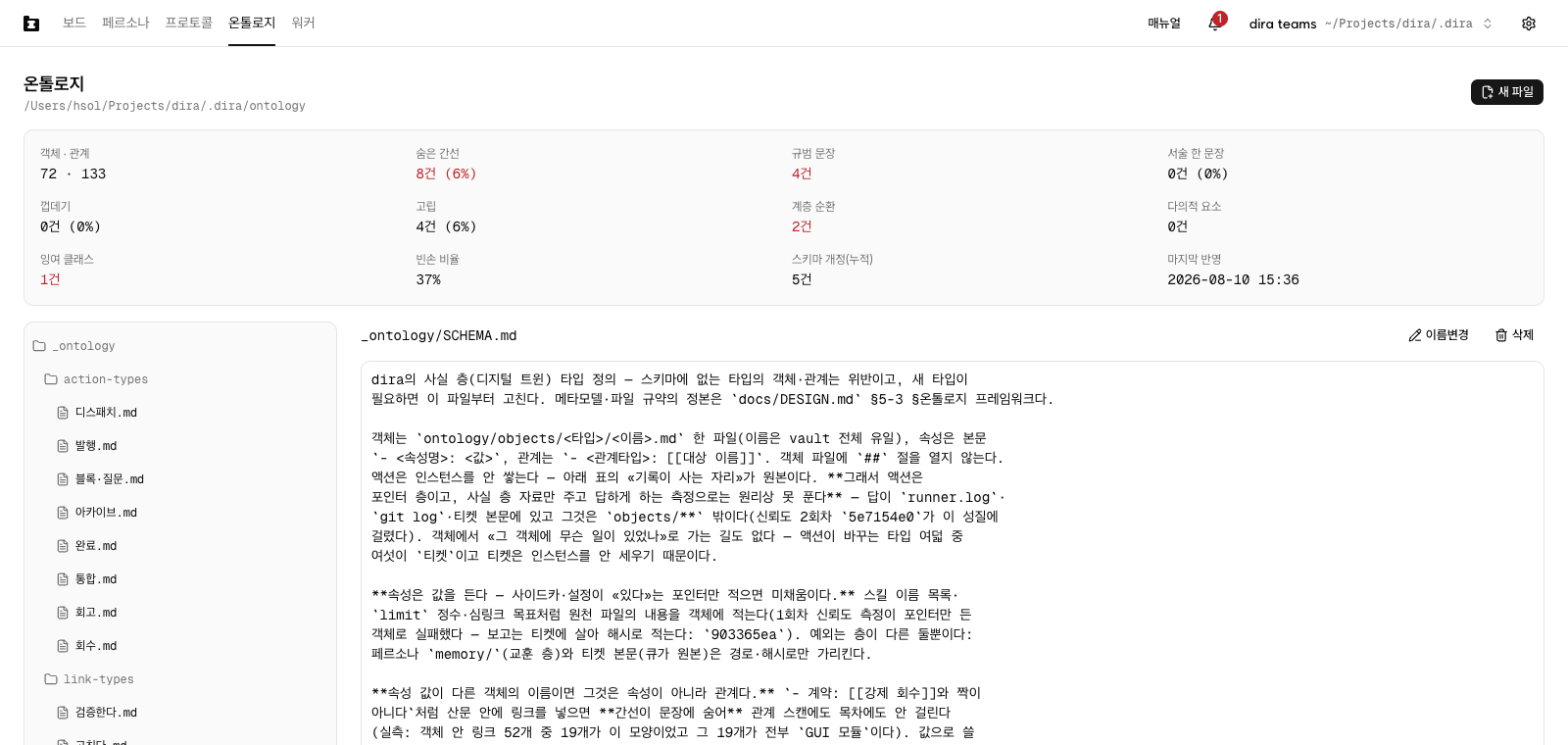
The ontology screen - one path line and the file tree
Ontology in the left nav. The grey text under the title is where this project's cards
actually are. The default is ontology/ inside the queue folder, next to the personas and the
protocols. That line is there to read; you cannot edit it here. The field that changes it to
another folder is in Settings (Moving where the cards are
kept).
This screen is for reading and editing cards. The three things that set a value for the whole
project - the ontology location, the metrics panel, the folder to import - are gathered in the
Project node of Settings (see The screens, under the settings dialog). What
stays on the screen is that path line and two alerts about the folder you are looking at right
now: Schema violations and Not dira format.
It looks like the Protocols screen. Tree on the left, editor on the right.
The icon for collapsing the list is in the same place with the same words (Collapse the file list - Expand the file list). The editor has the two modes that chapter describes. It opens
in WYSIWYG, and when you need to see the markdown in a card directly, the icon button in the top
right corner of the pane takes you over. Choosing a file puts it in the address, so you can link
straight to it. Change one character and Save lights up. New file is in the same top-right
corner too.
Two things differ from Protocols. First, this screen opens nothing for you. You come in to
Pick a file. sitting where the editor would be. With the list collapsed, that line reads
Expand the file list and pick a file. Second, directories in the tree fold and unfold. This is
the only tree in the app that does that.
Here is what the tree holds.
_ontology/SCHEMA.md- one map. What kinds of things this project has, and by what names they connect to each other, are in here. Open this one first._ontology/object-types/_ontology/link-types/- one definition per kind, one per relation. The map's tables carry the name and a one-line meaning; details like which properties are required come down here.objects/<kind>/- the cards themselves. One file is one thing, and the filename is its name.action-log/<date>.md- one file a day along the timeline, recording what appeared and what changed and when.templates/- the empty shells you copy to start a new card.
Directory names are content too. 프루퍼주식회사/인물/임한솔.md - a company, then people, then
one person - puts the what-of-what into the path. There is no depth limit. Move a card, folder
and all, and the links between cards do not break, because a link is by name and not by path.
Moving where the cards are kept
If you already have a folder of these somewhere else, you do not have to move it into the queue.
The field is in Settings. Press the gear at the top right, then
pick the project name under Project, the first group in the tree. Edit ontology location
comes right after Folder to import. Put in a path, press Save, and every worker on this
project looks at that folder. The ontology belongs to one queue, so there is no place to give each
worker a different value.
What it takes is an absolute path outside this project's git working tree. The hint in the
empty field says exactly that. ~/Notes and its tilde are fine. On save it goes in as the real
path with symlinks resolved. In the desktop app, Browse beside the field picks the folder for
you.
There are three refusals. A red box appears under the field, and the value you typed is printed after the reason.
Must be an absolute path:- something like../vault, where there is no telling what it counts from.Not an existing directory:- a folder that is not there, or a file that is not a folder. Accept a place that does not exist and the screen draws an empty tree as if that were normal.Inside this project's git working tree- a path pointing into the repository or underworktrees/. Put it there and every worker gets its own copy, and nobody can tell which one is the real one. The queue folder itself is not in git, so that one is accepted.
To undo it, empty the field and press Save. That line comes out of the worker file and the grey
line on the ontology screen goes back to the default - ontology/ inside the queue folder, with
assumed default on the end. If you are on the default now, the field opens empty. There is no
separate revert button.
Open a worker file yourself and write a path inside the working tree and the engine will use it.
What happens instead is that the grey line on the ontology screen shows the value with Inside this project's git working tree beside it. The ontology row on the workers screen only tells you what
the worker file says. The one place that decides is this field in Settings.
The folder you point at connects even if it is not in dira format. The check looks at two places
only - _ontology/SCHEMA.md and objects/. With neither there, Not dira format comes up under
the title on the ontology screen. The form that brings the folder over is Folder to import in
Settings (Pulling in a folder from outside). You do not get
hundreds of lines of violations. The folder is not broken. It just has not been moved yet. Point at
a folder that is altogether empty and the screen gives you the survey below.
Directories open one at a time
Come in the first time and the tree is entirely folded. All you see are the top lines -
_ontology, objects, action-log, the top-level directories. Even with several hundred cards,
the first screen ends after those few lines.
At the left end of a directory line is a small arrow pointing right. Press anywhere on the line
and the arrow turns down and what is inside comes out. A directory inside comes out folded, so
press it once more. To find a card in objects/워커/, open objects and then 워커 inside it.
Every other branch stays shut. Press the same line again and it folds back.
What you unfolded does not stay in the address. Choosing a file closes what you had open on
another branch. What does happen is that opening a file by address draws only the
directories on the way down to it unfolded. Follow a link to _ontology/SCHEMA.md and
_ontology is open with SCHEMA.md inside it marked as selected. Nobody has to hunt through the
tree for the file a link already named.
Frontmatter is two cells per line
Between the two --- lines at the top of a card is the frontmatter. In the WYSIWYG editor this
sits above the body, separated by a horizontal rule. One line is one row, with the key on the
left (Key) and the value on the right (Value). Put the cursor in a cell and type. Change one
character and Save lights up at the bottom right, and Revert beside it puts you back to
before you saved.
Only the rows you edited change. A line you did not touch is identical down to the byte after saving. A long value opened with a quote and carried onto the next line stays exactly as written, as long as you leave that row alone.
Adding and deleting rows
At the right end of a row are two handles. + puts an empty row directly below it, and x
deletes the row. Hover the row and both darken. Deleting does not ask twice, so if you pressed
the wrong one, use Revert before you save.
A new row starts at the same level as the row above it. Press + next to 돌린다: under
links: and you get one more empty row at that relation's level.
An indented line is its own row
Under links: there are two levels, the relation type and the target. 돌린다: and
- 디스패치 루프: below it are each their own row; each level just adds one step of left
margin. The margin stops at four levels. A line deeper than that is still edited as its own row.
A row like links:, with an empty value and deeper lines under it, shows the key cell only. The
value cell is left blank.
A bracketed value gets one line per item
aliases: [헤더 브랜드 마크, BrandMark] comes up as two items. The x at the right of a line
deletes that one item, and Add item under the list grows it by an empty line. Delete every
item and the aliases: line stays, as []. A key the schema asks for does not disappear on its
own.
A comma in a value with no brackets is just a comma. A long sentence in description: does not
get chopped at every one.
A value that is empty as [] shows nothing but the Add item button. Press it to pull out one
empty cell and write the first item there, and you get aliases: [헤더 브랜드 마크]. Pull it out
and write nothing and the value stays [].
A cell with candidates gets a caret
Press the small caret at the right end of a cell and a list opens with a Search box on it. It
is attached in four places.
- The value cell of
type:- every kind in_ontology/object-types/. - The key cell of a relation type under
links:- every relation in_ontology/link-types/. - The value cell of a target line under that - every card name in this ontology.
- The key cell of a new row - the properties of the kind definition that card's
type:points at, plus the six common keys (typenamealiasestagsdescriptionlinks).
Keys already in the file drop out of the candidates. On a card where every usable key is in
place, there are zero candidates and the caret does not appear at all. It does not appear on a
cell you write sentences into, like description:, either.
A value you picked is still a value you can edit. The list is only a handle for filling a cell, so typing a name that is not among the candidates is not blocked.
The screen does not check your frontmatter
Nothing tells you a required property is missing or that a kind name is misspelled. Write it
wrong and it saves wrong. What catches the mismatch is the Schema violations box under the
title.
Switch to plain text - when you need the file as it is
At the left end of the first line above the rows is Switch to plain text. Press it and the
rows go away and the frontmatter source, --- lines included, appears in one box. Coming back
is Switch to rows, in the same place.
There are three times to use the plain box. Editing a value that spans several lines while seeing the line breaks; separating a line that did not parse as a row and got stuck onto the value of the row above it; and putting the first item into an empty pair of brackets, as above.
The mode you pick behaves like WYSIWYG and source do. It stays on this computer and does not differ per field. The default is the row editor.
Switch the whole editor to Switch to source and this handle disappears. Then the frontmatter
and the body are both just the characters in the file.
Protocol documents and persona profiles have no --- block, so this area never appears there.
The two screens where the row editor shows up are the ontology and the ticket detail
(frontmatter fields).
The twelve numbers in Settings - a bad pile shows here first
The metrics panel is in the Project node of Settings, right under Edit ontology location.
Twelve cells, all of them counted from the files right then and there. Counting opens every card,
so it can come up later than the rest of the panel. On a project with no ontology, or one not in
dira format, the whole thing stays away. You do not have to memorize the twelve. The ones you end
up looking at are these.
| Cell | What it tells you |
|---|---|
Objects · relations | How many cards there are and how many lines run between them. Cards going up while lines stay flat means you have a list, not a graph |
Normative sentences | How many sentences on the cards end in "should" or "must". Zero is normal |
Hidden edges | Places where the body names another card without a relation to it. Lines that do not get counted |
Empty-handed rate | The share of archiving rounds that had no fact to leave behind. 30-70% is normal. Under 10% takes on a colour - it means sessions are forcing themselves to write something |
The other eight measure how thin the cards are - shells, isolated, one-sentence prose - or catch
tangles in the kind definitions, like hierarchy cycles, polysemous elements and redundant
classes. Last update is the date of the most recent record. When that value sits still for a
long time, archiving itself has stopped running.
When a card uses a kind or a relation the map does not have, a Schema violations box appears. Up
to ten offending files and lines are printed as they are, and past that it folds into
Another N found.
This box alone stays out of Settings, under the title on the ontology screen. The other twelve cells are statistics; this one is an alarm. It carries the button you press to go and fix things, and behind a dialog nobody would see it.
Fix violations - handing the violations to one ticket
There is a button in that box. It reads Fix violations.
Pressing it does not fix files on the spot. It puts one ticket in the queue. The screen goes
to the detail page of the ticket it just made, so you can read what you asked for right away. The
body gets the violation lines that were in the box, along with the time they were measured. Up to
50 lines, folding into Another N found past that. What is left is the next round's share.
The receiving side is the same as the one that runs archiving (archive-manager). That session
writes into ## 결과 what it fixed on each line, or why the line was not a violation after all,
and leaves one line in action-log/ about what it applied. If a worker is idle, it picks the
ticket up without waiting for the next round.
Press it twice and there is still one ticket. While the cleanup ticket is unfinished, a link
takes the button's place, reading something like Cleanup ticket a1b2c3d4 In progress, and
pressing it goes to that ticket. Two tabs open and pressing in both does the same thing. Just
before issuing, it sweeps the queue once more, and if one is already there it opens that instead
of making a new one.
If the cleanup ticket is done and the box is still there, the button comes back. That means the round did not fix everything, so send it once more. When violations reach zero, the box goes away entirely.
Empty means four questions first
A project with no ontology runs fine. If the folder is empty, the engine moves on without a word.
So the first state of this screen is not an empty tree but a survey. Answer a few questions and you get files to start from.
It asks four. What this project mostly deals with, what you will end up naming over and over as you work, what you think you will want to ask later, and what is not worth keeping in order. The first option of the last question is this management tool itself, and it is checked from the start.
Press Create and your answers go straight into a map. Three to five kinds, two to four
relations. Each of them gets one definition file, and the kinds get an empty template as well.
That is all of it. Starting small is the design. The rest arrives as you work.
Then comes the first pass. With only a map and zero cards there is nothing to read, so one
session walks the project folder and makes the first cards. Create calls that session too. The
moment you press, an ontology migration ticket appears in the queue, so there is nothing to wait
for on this screen. Go to the board and it is there among the other tickets as
archive-manager's, and going in shows you what it is standing up.
If nothing comes to mind, skip it. Starting from an empty file with New file is fine too. Not
making one at all is fine; the project runs either way.
One more ticket runs after Done
This is the loop that runs day to day.
The order a session finishes a ticket in is fixed. It finishes the work, confirms the push
succeeded, and then changes the file to .done. The archive ticket is issued between those two.
Ahead of the push and you have an archive of work that was never integrated; after .done and
the session may already be over.
The new ticket carries persona: archive-manager. It is one of the default personas created
along with the project (Personas). The target is always a single ticket.
Nothing gets batched.
One deps line goes on too. It means this ticket does not surface in the queue until the target
is .done. Without that line, an archiving session appends a section to a file the previous
session is still writing ## 결과 into. That window was open once, for real. So it was shut.
An archive ticket does not issue an archive ticket. That one line breaks the loop.
There is a cost. One completion is one ticket, so a worker spends that much time not doing something else. If you decide against it, delete that section from the Protocols document. It is a convention rather than an engine feature, so the place to turn it off is one file.
Where you see it - one line under the done card
An archive ticket does not stand as its own card on the board. Instead, one line goes at the very
bottom of the target's card. The same slot where a .wip card carries what it just did.
There are three wordings. Archiving — queued, Archiving, and Archiving — awaiting answer.
Press it and you are in that archive ticket's detail. That line is the only way there from the
board. When archiving finishes the line disappears. Finished is the normal state, and it has
nothing to say.
On the ticket detail a line appears in the relations section. Archive on the target's side,
Archive target on the archive ticket's. They point at each other from both ends.
At the very bottom of the target ticket's body a ## 아카이브 (the archive section) is appended.
What went into the ontology this round is written there. ## 결과 is not rewritten. Above is the
writing of the session that did the work and below is the archiving session's, and the two stand
side by side.
What goes on a card - facts only, or nothing
One card is three layers - description, properties, relations. The layers are three but the places
are two, so the properties and the relations share the frontmatter at the top of the file. Under
the kind and the name, a line like scriptPath: or branch: holding a value of the thing itself
is a property, and a line under links: pointing at another card is a relation. The description
stays in the body below, in prose, saying what that thing is and why it is in the state it is in.
A new fact splits the same three ways. A value is a property, a pointer to another card is a
relation, a reason or a history is description.
There is one criterion. Write the state that is true now, and do not write a judgement about what should be done next.
- Goes on the card - "this worker still has the old wording, which does not match the measured path"
- Does not - "it is better to read the log before re-dispatching"
The second one is not thrown away. It just belongs somewhere else, in the persona memory. Without that split the ontology becomes the memory. All you get is two copies of the same files.
Having no fact to leave behind and writing nothing is a normal ending. The session writes
"nothing to hand over this round" in the ## 아카이브 section, leaves one line in the record, and
stops. Most tickets go that way. That is why a low empty-handed rate is the thing to be
suspicious of.
What the next session gets is where it is and how to search it
The place the pile comes back is the session prompt. Every time a ticket is dispatched, one short
block goes on. Where the ontology is, which file is the map (_ontology/SCHEMA.md), and that the
way to reach a concept is to grep for it in the ticket's own words. That is the whole block.
The bodies are not inlined. So however many cards there are, this block does not grow. This is where it differs from a profile. A profile costs every session as much as it has grown (Personas), while the ontology could reach thousands of cards and the prompt would be the same. In exchange, the session goes and reads what it needs itself.
If the folder is missing or there is not one .md in it, the block is not attached at all. No
warning either.
Already running a project - migration
The survey is for a new project. A project with tickets already piled up has another door. Open
Settings and press the project's name under the first tree group, Project. Below the resolved
values table in that panel is Ontology migration. The gear on that row in the project list takes
you straight to the same place (see Screens, under the settings dialog). The
description sits right there: Sets one up if there's none, and re-applies the latest conventions if there is. Safe to run again.
Running it again is normal use. Cards you edited by hand are not overwritten. What already matches the conventions is not touched. Old records are not thrown out. Only what counts as fact is pulled up onto cards, and judgements go over to the memory side.
Start migration is not a button that runs on the spot. It is like Fix violations above -
one ticket appears in the queue and the screen moves to that ticket's detail. The rest is a
worker's, so you can close the dialog, or the tab.
Where you watch it is that ticket's detail. The address is /p/<project>/tickets/<hash>, and
what the session is reading and changing flows through the Progress record. You
do not have to remember the hash. Open Settings again, go back to that same node, and where
Start migration was there is a link instead, reading something like Migration a1b2c3d4 Open. The button does not come
back until that ticket finishes. Press twice and there is still one ticket.
When it completes, the button returns. That is the signal that one session could not walk all of it. Press it once more. This is the place where running it again being normal use pays off.
Pulling in a folder from outside
A folder of meeting notes, an old wiki, a pile of material you downloaded. There is a separate
door for turning what has stacked up outside the project into cards. It is in that same panel, just
under the migration. Put a path in Folder to import and press Import. The folder's name
becomes the source name. Put in Notes and every card salvaged from there carries Notes.
What this makes is one ticket as well. Its title is 온톨로지 import - <folder name> ("ontology
import" - Korean whatever language the site is in), and the screen moves to that detail. What
differs from migration is the unit of counting. One per folder, so the button does not
disappear - another folder goes through even while a ticket is open. Instead, lines like Import a1b2c3d4 Notes Open stack up under the help text, one per folder. Press again with the same
folder and it does not make a new ticket; it takes you to the one already there.
One folder, and it stays
The ontology is not a database. It is a pile of markdown files. On the default it is inside the queue folder, so it travels with the project, and deleting the app leaves the files.
Links between cards are written [[name]], so open that folder as an obsidian vault and the
graph is right there. An editor, grep, whatever you like.
One thing to know in advance. The queue is not in git. Neither is this folder. Moving it does not change that - the value it accepts is outside the git working tree by definition. Somebody who clones the repository gets zero cards, so sharing with a team means moving the folder separately.
Next is Epics.